

Description
No API key. No account. No setup. Unlike other AI FAQ generators, which make you sign up for OpenAI or Gemini and paste in your own paid API key, AltoFAQ runs the AI on our hosted service, so there is nothing to configure. You generate each FAQ with one click from the post editor, free for the first 10 every month.
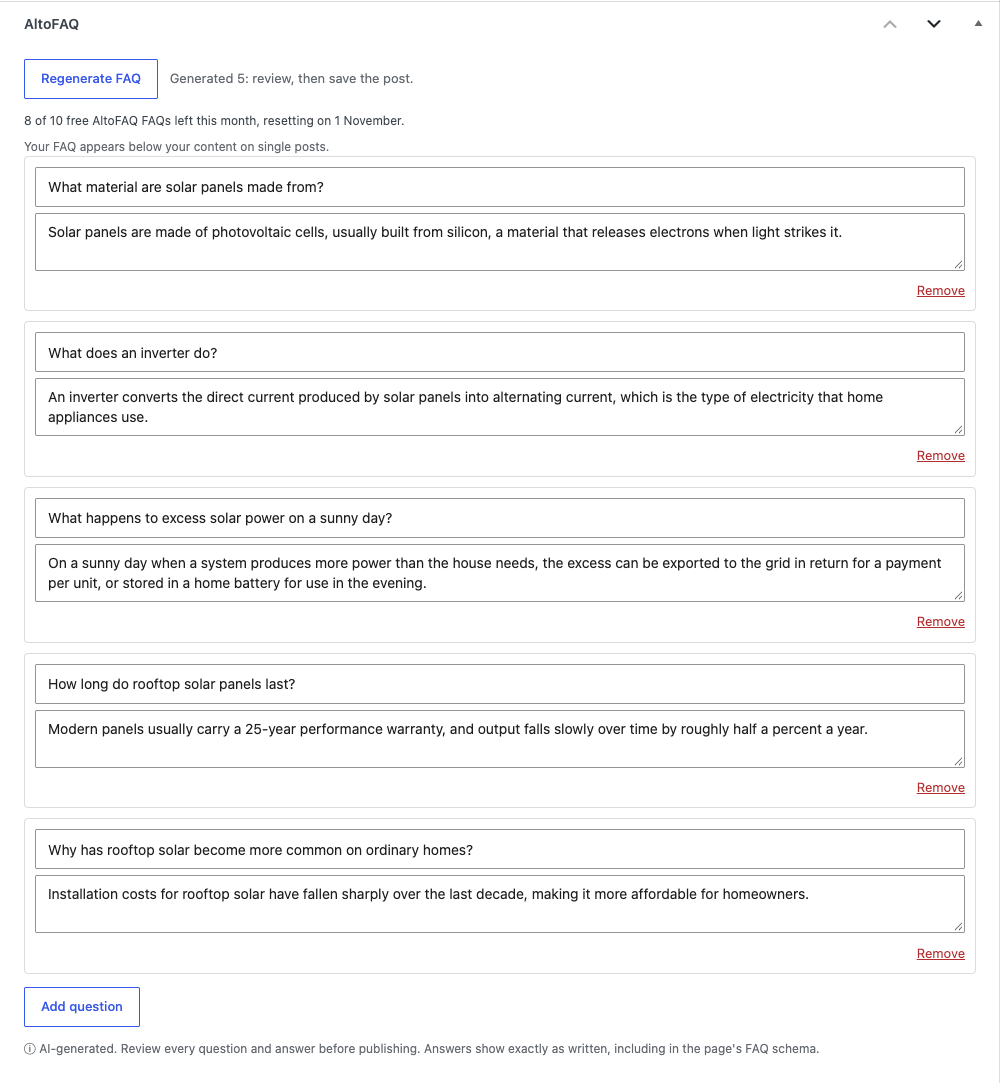
Each FAQ is a set of questions a reader of your post is likely to ask, each answered from your content. You review and edit them, and once you save the post they appear as an accessible accordion with valid FAQPage structured data, wherever you put the [altofaq] shortcode or, if you switch on automatic insertion, below the article.
Google retired FAQ rich results in May 2026, so this is not a “rich results” plugin. What FAQ content still does: FAQPage schema is still valid and parsed, AI search engines (AI Overviews, ChatGPT, Perplexity) favour clean structured Q&A, featured snippets still benefit, and a clear FAQ is genuinely useful to readers.
The free plan covers 10 FAQs per month; AltoFAQ Pro raises that limit (subject to fair use).
- No API key or third-party account. The AI runs on our service.
- One click to generate an FAQ from the post editor, then edit or remove any question before it shows.
- Optional generation when you publish. The questions wait in the editor for your approval and are not shown, or added to your schema, until you approve them.
- Accessible accordion display, built on native HTML so it works with the keyboard and screen readers.
- Valid FAQPage JSON-LD that always matches the questions shown on the page.
- Show it via the
[altofaq]shortcode, or auto-insert it into single posts. - Privacy-friendly: automation is off until you switch it on. To generate an FAQ we send the post title and content, with a site ID (a hash of your site URL) and the plugin version. The External services section below lists everything that is sent.
- Pro: a higher monthly limit (subject to fair use).
External services
This plugin connects to the Really Useful App Company API to generate FAQs. It is required for the plugin’s core feature.
- What is sent and when: the plugin sends the post title and post content to the API on each of these actions, and nothing else triggers a send of your content:
- when you click “Generate FAQ” in the editor
- when you publish a post with “Generate an FAQ when a post is published” ticked
- Also sent: a site ID (a hash of your site URL) for usage counting, and the plugin version, so we can tell which release a report relates to. We treat the site ID as personal data, because it can be matched to your site’s address. Our privacy policy explains how we use it. Whether this site’s review prompt was shown, snoozed, dismissed or clicked is also sent, so we can tell whether that prompt is working. It records the site, not the individual user, and says nothing about what you did on WordPress.org afterwards. If you choose to give us an email address, it is sent on its own, only when you submit your email address on the settings screen. It is optional, you are asked once (and again only after we have deleted it), and every feature keeps working if you skip or dismiss it. It is sent only if you tick the sign-up box, together with the wording you agreed to. We use it to send release notes and product updates and to give you a way to reach us. These emails are sent from our Microsoft 365 mailbox. You can unsubscribe from any message, and we delete it 24 months after your last contact with us. Whether this site’s email prompt was shown, dismissed or submitted is also sent, so we can tell whether it is working; it does not include the address itself.
- Where it goes: the API (default
https://api.thereallyusefulappcompany.com), which uses Anthropic as an AI subprocessor to generate the text. - Terms / privacy: https://www.thereallyusefulappcompany.com/altofaq/terms , https://www.thereallyusefulappcompany.com/altofaq/privacy , https://www.anthropic.com/legal/privacy
Nothing is sent until you click generate, or publish with “Generate an FAQ when a post is published” ticked. If you choose to give us an email address, it is sent when you submit it.
Screenshots


Installation
- Install and activate AltoFAQ.
- Go to Settings AltoFAQ, review the external-service notice, and choose how the accordion should display.
- Edit a post and click Generate FAQ in the AltoFAQ box, review and edit the questions, then update the post.
- (Optional) Enter an AltoFAQ Pro licence key to raise the monthly limit.
FAQ
-
Do I need an AI API key?
-
No. The AI runs on our service, free for the first 10 FAQs a month.
-
Does this bring back Google’s FAQ rich results?
-
No, and no plugin can. Google removed FAQ rich results in May 2026. AltoFAQ is built for what FAQ content still helps with: valid schema for AI search and semantic parsing, featured snippets, and a clear on-page FAQ for readers.
-
Can I edit the questions before they appear?
-
Yes. Generated questions and answers are fully editable and removable in the editor. Nothing shows publicly until you save the post. An FAQ generated when you publish is held the same way, until you review it and update the post.
-
Where does the FAQ appear?
-
Wherever you place the
[altofaq]shortcode, or automatically at the top or bottom of single posts if you enable that. -
Does it send my content anywhere?
-
Only when you generate an FAQ, and only the title and content. See the External Services section.
Reviews
There are no reviews for this plugin.
Contributors & Developers
“AltoFAQ – AI FAQ Generator & Schema” is open source software. The following people have contributed to this plugin.
Contributors
Translate “AltoFAQ – AI FAQ Generator & Schema” into your language.
Interested in development?
Browse the code, check out the SVN repository, or subscribe to the development log by RSS.
Changelog
1.0.22
- Fixed: on a password-protected post, the FAQ box and its FAQ schema no longer show to visitors who have not entered the password.
- Fixed: the Dashboard notice about FAQs waiting for approval now lists only posts you can edit, so it no longer names other people’s private posts.
- Changed: the settings screen now says the site ID is treated as personal data, as our privacy policy does.
- Changed: the free plan is now 10 FAQs a month (it was 25).
- Changed: an FAQ generated when a post is published now waits for your approval in the editor and is not shown on your site, or added to your schema, until you review it and update the post. The Dashboard lists any that are waiting. Generation on publish runs once per post.
- Fixed: in the block editor, an FAQ generated when a post was published was removed again straight away by the editor’s own save.
- Changed: small wording fixes on the settings screen, in the editor and in the list of our other plugins.
- Added: the AltoFAQ box in the editor always shows how many free FAQs are left this month, not only once you are close to the limit.
- Fixed: on a site with more than one Alto plugin, an older Alto plugin could supply this plugin’s shared code, which could silently switch off newer features such as the monthly-limit notice. Each Alto plugin now uses its own copy.
- Added: an optional sign-up for release notes and product updates by email, offered once on the settings screen after you have used the plugin a few times. You sign up by ticking a box, every feature works without it, and you can unsubscribe from any message.
1.0.15
- Fixed: when generating failed in the editor, it showed only “Failed”, never the reason or, at the monthly limit, the way to upgrade. It now shows both.
- Added: the number of free FAQs left updates in the AltoFAQ box each time you generate, without reloading the page.
- Added: a notice when this site has used its free FAQs for the month, on the Dashboard, the settings screen and the editor. It says what is paused, including the automatic FAQ on publish when that is switched on, and the date it resets. Previously an automatic FAQ could simply stop, with nothing to say why.
- Added: once 80% of the month’s free FAQs are used, the AltoFAQ box in the editor shows how many are left.
- Changed: reaching the monthly limit while generating now shows what happened, when it resets and how to upgrade, instead of a single line of status text.
- Changed: automatic FAQs on publish are part of the free plan, and the settings screen no longer labels them Pro.
- Changed: the request for a review is not shown while the site is at its monthly limit.
1.0.12
- Fixed: a licence key that our service does not recognise is no longer shown as “Pro”. The plugin now says the key was not recognised and keeps the upgrade link visible, instead of silently putting you on the free allowance with no way to correct it.
- Changed: your licence key is no longer shown in full or left in an editable box. Settings now shows only the last four characters, and replacing the key takes a deliberate click on “Update key”, so it cannot be typed over by accident. Removing a key is its own checkbox.
1.0.10
- Fixed: the address the plugin uses to reach our AI service is now required to be https, both when it is saved and every time it is read. Only an administrator could ever have changed it, and the default has always been secure, but an insecure address entered by hand would have sent your licence key and your content unencrypted. An address that is not https is now refused and the secure default is used instead.
- Fixed: the FAQ structured data AltoFAQ adds to your page is now escaped where it is written out, not only where it is stored. Your FAQ text was already cleaned on the way in, so nothing was ever at risk; the protection now sits at the point it is needed rather than one step away from it.
- Fixed: the panel no longer says “AI-generated” about questions you typed yourself. That note now appears only for questions AltoFAQ has just written.
- Fixed: the editor panel now loads the script it depends on rather than relying on another plugin or screen to load it.
- Fixed: after generating, the panel said to click “Update” to save. On a new post that button reads Publish or Save, so it now just says to save the post.
1.0.6
- Fixed: a generated FAQ could be saved and never appear anywhere on your site, with nothing to explain why. The panel now says where your FAQ will appear, and when it will not appear it tells you how to switch it on.
- Added: a Settings link on the Plugins screen, and a short notice after activation saying where to go.
- Fixed: after generating, the button now reads Regenerate FAQ instead of looking like the main action again.
1.0.5
- Added: the plugin now reports whether this site’s review prompt was shown, snoozed, dismissed or clicked, so we can tell whether the prompt is working at all. It rides the request the plugin already makes, so no new outbound request is made and no new action triggers a send. It records the site rather than the individual user, and nothing about what happens on WordPress.org afterwards.
- Housekeeping: the front-end style is now registered with a version. No functional change; it silences a checker warning that could not apply here, so a standing warning does not hide a real one later.
1.0.4
- Fixed: when the AI could not be reached, the questions were still labelled “AI-generated”. They are now described plainly as coming from your own text, so you know to rewrite them before publishing.
- Added: the review prompt now appears in the post editor, where FAQs are actually written, instead of only on the settings screen.
- Added: the plugin now reports its own version with each request, so we can tell which release a problem relates to. No personal data is involved.
- Housekeeping: the list of actions that send data is now checked automatically against the code before every release.
1.0.3
- Compatibility: tested with WordPress 7.1.
- New: a “Your usage” panel on the settings screen showing how much of this month’s
allowance you have used, with a progress bar. - New: an “Upgrade to Pro” link on the settings screen for free-plan users.
- When a monthly limit is reached, the message in the editor now includes an upgrade link.
1.0.2
- Corrected the AltoGraph name in the list of our other plugins shown on the settings screen.
1.0.1
- Added an optional, dismissible prompt on the settings page inviting an honest review after you’ve generated a few times. No tracking; dismiss any time.
- Added: AltoScribe to the list of our other plugins shown on the settings screen.
1.0.0
- Initial release: one-click AI FAQ generation, review-and-edit editor, accessible accordion, valid FAQPage schema, shortcode, auto-insert, and Pro auto-generate.