

Description
Seory Posts to Markdown converts your site content into clean Markdown files and bundles them into a single ZIP archive — ready to hand to AI tools, static site generators, or any Markdown-based workflow.
Runs on your server. No API keys, no accounts, and no external service of its own. With the raw content mode, conversion contacts no external service. With the rendered content mode of the ZIP export, WordPress applies the same content filters as when a post is displayed, so embeds (oEmbed), your theme, or other plugins may contact external services. See the FAQ.
Features
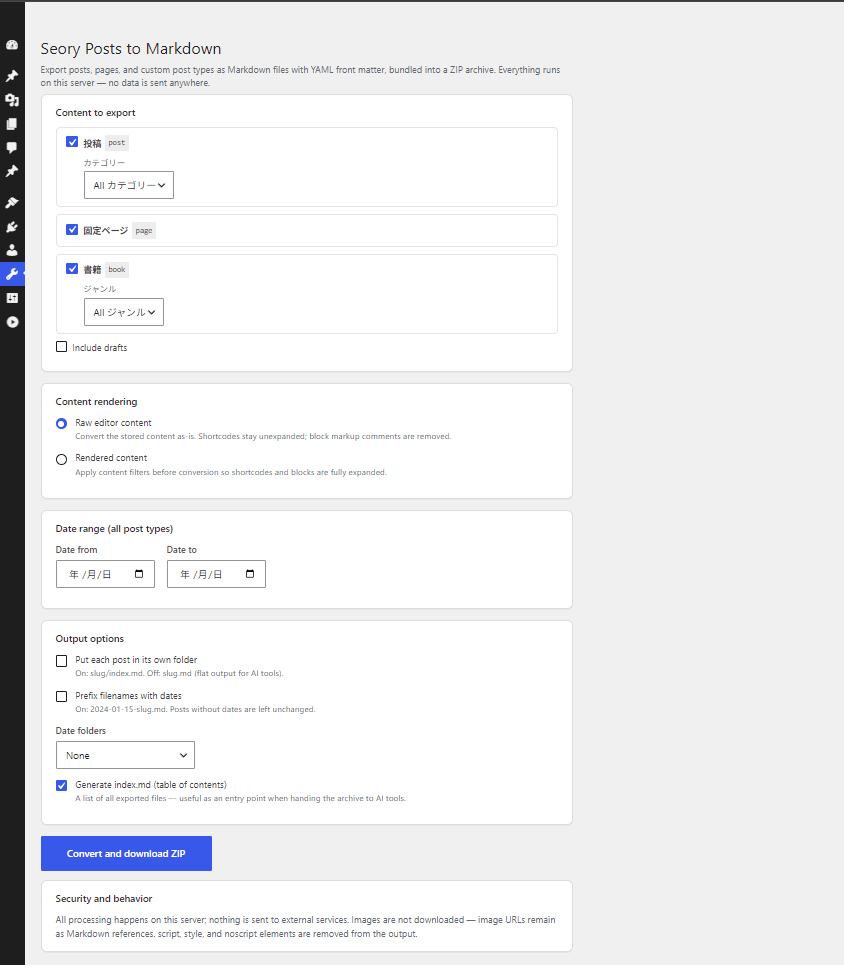
- Export posts, pages, and public custom post types in one click
- YAML front matter: title, date, type, status, slug, link, author, featured image, categories, tags, custom taxonomy terms, draft flag
- Two content modes: raw editor content, or fully rendered content with shortcodes and blocks expanded (
the_contentfilters applied) - Per-post-type taxonomy filters (categories, custom taxonomies) plus a global date range; optionally include drafts
- Flexible output layout: flat files (
slug.md), per-post folders (slug/index.md), date prefixes (2024-01-15-slug.md), and year / year-month folders - Optional
index.mdtable of contents — a convenient entry point when handing the archive to AI tools - GFM tables, fenced code blocks, ATX headings
- Batch processing keeps large sites within PHP time limits
- Read-only WordPress Abilities (WordPress 6.9+) so AI tools can list changed posts, fetch a post as Markdown, and list external links through your site’s own REST API
What it does not do
- Images are not downloaded; image URLs remain as Markdown references
script,style, andnoscriptelements are removed from the output
Related
A browser-based version (convert a WordPress export XML without installing anything) is available at tools.seory.co.jp/wp-to-markdown.
Screenshots
Installation
- Install and activate the plugin.
- Go to Tools Seory Posts to Markdown.
- Choose post types and output options, then click Convert and download ZIP.
FAQ
-
Is my content sent anywhere?
-
This plugin does not send your content to its developer, and it has no external service of its own. Conversion runs on your own server, and the generated ZIP is deleted right after download. Whether anything else contacts an external service depends on the content mode:
- Raw editor content (ZIP export, and
get-post-markdownwithmode=raw): thethe_contentfilters are not run, so conversion contacts no external service. - Rendered content in the ZIP export: the
the_contentfilters run exactly as when a post is displayed. If a post contains an embeddable URL on its own line (for example a YouTube link), WordPress’s oEmbed feature may request the embed code from that provider and cache it in post meta, and your theme or other plugins hooked intothe_contentmay make their own requests. - Abilities (
get-post-markdownwithmode=rendered, andlist-external-links): oEmbed is turned off while they render, so they make no oEmbed requests and do not write the oEmbed cache; embeds stay as plain URLs. Requests made by your theme or other plugins insidethe_contentare not blocked.
- Raw editor content (ZIP export, and
-
What is the difference between the two content modes?
-
Raw editor content converts the stored post content as-is: shortcodes stay unexpanded and block markup comments are removed. Rendered content applies the
the_contentfilters first, so shortcodes and blocks are expanded to their final HTML before conversion. -
Which user roles can use it?
-
- ZIP export (Tools Seory Posts to Markdown): users with the
exportcapability (Administrators by default). - Abilities (for AI tools, WordPress 6.9+): any logged-in user for published posts, and Editors and Administrators for other statuses, always limited to the posts that user can read or edit. See “Which abilities are available, and who can use them?” below.
- ZIP export (Tools Seory Posts to Markdown): users with the
-
Are custom post types supported?
-
Yes — all public custom post types appear in the post type list.
-
Can I customize the front matter?
-
Yes. Developers can add, remove, or reorder keys with the
seoryco_wpmd_frontmatterfilter:add_filter( 'seoryco_wpmd_frontmatter', function ( $pairs, $post ) { $pairs['subtitle'] = '"' . get_post_meta( $post->ID, 'subtitle', true ) . '"'; return $pairs; }, 10, 2 );Values must be YAML-formatted; keys with an empty-string value are omitted.
-
Can AI tools access my content directly?
-
Yes, optionally. Starting with version 0.2, on WordPress 6.9+ this plugin registers read-only WordPress Abilities (
wp_register_ability()) for listing posts, fetching a single post as Markdown, and listing external links. AI tools and agents (such as Claude Code or Codex) can call these through WordPress’s own REST endpoint (/wp-json/wp-abilities/v1/abilities/...) using an Application Password — the same authentication method used by the standard WordPress REST API. The request comes from the AI tool to your own site, exactly like any other REST API client; this plugin does not push your content to its developer or to any other service (see “Is my content sent anywhere?” for what rendering may contact). We recommend creating a dedicated WordPress user with limited capabilities for this purpose.If you also install the third-party MCP Adapter plugin, these abilities can be exposed as MCP tools as well. MCP Adapter is not bundled with this plugin.
-
Which abilities are available, and who can use them?
-
All abilities are read-only and are called with GET, passing input as
input[...]query parameters:seoryco-wpmd/list-posts— posts modified after a given time (modified_after, e.g.2026-09-01T00:00:00Z), oldest change firstseoryco-wpmd/list-post-ids— every post ID with its status and modified time, including trashed items, in ID order, for detecting deletionsseoryco-wpmd/get-post-markdown— one post as Markdown with front matter, the same format as a file in the ZIP export (withmode=rendered, embeds are not fetched and stay as plain URLs)seoryco-wpmd/list-external-links— links to other domains with anchor text, rel, target, and surrounding text. At most 200 links are listed per post (truncated), and only the first 1 MB of each post’s rendered HTML is scanned (content_truncated,content_truncated_post_ids; developers can change the size with theseoryco_wpmd_links_max_html_bytesfilter)
The list abilities are paged with cursors: pass
next_cursor(list-posts, list-external-links) ornext_after_id(list-post-ids) from one response ascursor/after_idin the next request, with the other input unchanged, until it isnull. Posts edited or deleted while you page through do not cause others to be skipped.“Modified time” is the effective modified time:
post_modified_gmt, or, when that is0000-00-00 00:00:00(drafts inserted directly by some importers),post_modifiedconverted to GMT with the site’s current UTC offset. Known limitation: if the site’s time zone switches between daylight saving and standard time while you page throughlist-postsorlist-external-links, such posts can move by an hour and be missed in that run. A periodic full comparison withlist-post-ids(for example monthly) picks them up.Permissions are checked at two levels:
- Per request: requests limited to published posts need only a logged-in user (the
readcapability). Requests that include drafts, pending, scheduled, private, or trashed posts requireedit_others_posts(Editors and Administrators by default).list-post-idsalways requiresedit_others_posts. Developers can change this request-level capability with theseoryco_wpmd_ability_permissionfilter. - Per post: only publicly viewable post types are served, and a post is included only if the user can read it (
read_post, for published and private posts) or edit it (edit_post, for drafts, pending, scheduled, and trashed posts). Post types with their own capabilities are checked with those capabilities. The filter above cannot widen this.
Password-protected posts are never returned as Markdown or scanned for links.
Reviews
There are no reviews for this plugin.
Contributors & Developers
“Seory Posts to Markdown” is open source software. The following people have contributed to this plugin.
Contributors
“Seory Posts to Markdown” has been translated into 1 locale. Thank you to the translators for their contributions.
Translate “Seory Posts to Markdown” into your language.
Interested in development?
Browse the code, check out the SVN repository, or subscribe to the development log by RSS.
Changelog
0.2
- New: read-only WordPress Abilities for AI tools — list-posts, list-post-ids, get-post-markdown, and list-external-links (WordPress 6.9+).
- New:
seoryco_wpmd_ability_permissionfilter to adjust who can run the abilities. - New:
seoryco_wpmd_links_max_html_bytesfilter for the per-post HTML size thatlist-external-linksscans (default 1 MB). - Changed: requires WordPress 6.9 or later.
- Changed: clarified that the rendered content mode of the ZIP export can trigger embeds (oEmbed), theme, or plugin requests, as when a post is displayed. The abilities turn oEmbed off while they render.
- The ZIP export works as before.
0.1
- Initial release.